
What Is MVC? Is Rails an MVC Framework?
What Is MVC? Is Rails an MVC Framework?
MVC is one of the most famous architectural patterns in software development and one of the first terms you meet when learning Ruby on Rails. In this article we will look at what MVC is, where it came from, how a request travels through a Rails application, whether Rails can really be called an MVC framework, and how to keep each layer clean as the project grows.
What is MVC?
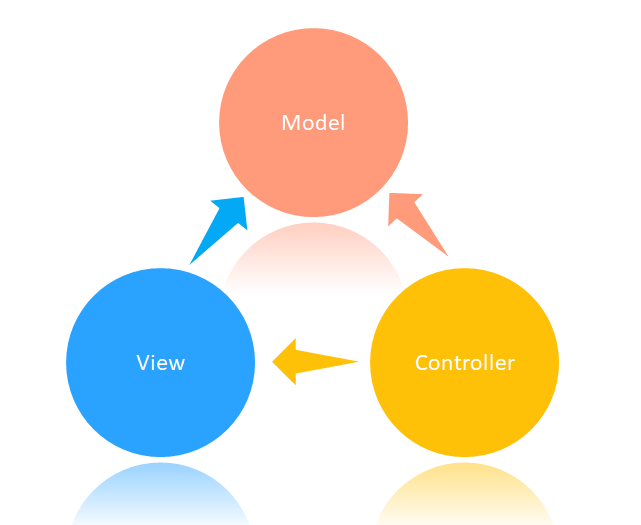
MVC (Model–View–Controller) is an architectural pattern that divides an application into three parts with different responsibilities:
- Model: data and business logic. The model knows what an order, a user or an invoice is, which rules apply to them and how they are stored.
- View: presentation. The view decides how data looks for the user: an HTML page, JSON, an email.
- Controller: coordination. The controller receives the user's input, asks the model to do the work and chooses which view to show.
The main idea is separation of concerns: business rules do not depend on how the page looks, and the page does not decide how data is saved. Each part can be changed, tested and understood separately.
A bit of history
MVC was described by Trygve Reenskaug in 1978–1979 while he was working with Smalltalk at Xerox PARC. It was created for desktop graphical interfaces: the view subscribed to changes in the model and redrew itself automatically, and the controller handled mouse and keyboard input.
Later, web frameworks adapted the idea to the request–response world of HTTP. This web version is sometimes called Model 2: the browser sends a request, the controller handles it, works with models and renders a view, and the finished response is sent back. Ruby on Rails (2004) made this approach hugely popular, and many frameworks followed it: Django, Laravel, ASP.NET MVC, Spring MVC, Phoenix.
How a request flows through a Rails application
- The browser sends a request, for example
GET /articles/42. - The router (
config/routes.rb) finds the matching controller and action:ArticlesController#show. - The controller reads the parameters and asks the model for data:
Article.find(42). - The model (Active Record) builds an SQL query, gets a row from the database and returns an
Articleobject. - The controller passes the object to the view, which renders HTML (or JSON).
- The response goes back to the browser.
Let us look at each part in code.
Routing
# config/routes.rb
Rails.application.routes.draw do
  resources :articles
end
This one line creates seven RESTful routes: index, show, new, create, edit, update and destroy.
Model
# app/models/article.rb
class Article < ApplicationRecord
  belongs_to :author, class_name: "User"
  has_many :comments, dependent: :destroy

  validates :title, presence: true, length: { maximum: 200 }
  validates :body, presence: true

  scope :published, -> { where.not(published_at: nil) }

  def publish!
    update!(published_at: Time.current)
  end

  def reading_time
    (body.split.size / 200.0).ceil
  end
end
The model contains associations, validations, queries (scopes) and domain behavior such as publish!. It knows nothing about HTTP, sessions or HTML.
Controller
# app/controllers/articles_controller.rb
class ArticlesController < ApplicationController
  before_action :set_article, only: %i[show edit update destroy]

  def index
    @articles = Article.published.order(published_at: :desc)
  end

  def show
  end

  def create
    @article = Current.user.articles.build(article_params)

    if @article.save
      redirect_to @article, notice: "Article created"
    else
      render :new, status: :unprocessable_entity
    end
  end

  private

  def set_article
    @article = Article.find(params[:id])
  end

  def article_params
    params.expect(article: [:title, :body])
  end
end
The controller is thin: it reads parameters, calls the model and decides what to do next: redirect or render a template. params.expect is the Rails 8 way to filter parameters; in Rails 7 the same is written as params.require(:article).permit(:title, :body).
View
<%# app/views/articles/show.html.erb %>
<article>
  <h1><%= @article.title %></h1>
  <p class="meta">
    <%= @article.author.name %> · <%= @article.reading_time %> min read
  </p>

  <%= simple_format(@article.body) %>

  <%= render @article.comments %>
</article>
The view only displays data that it received from the controller. It does not run database queries on its own initiative and does not contain business rules.
So, is Rails an MVC framework?
Yes. MVC is the backbone of Rails: the folders app/models, app/views and app/controllers, the libraries Active Record, Action View and Action Controller, and the naming conventions that connect them all follow this pattern. The official Rails guides describe Rails as an MVC framework.
But there are some important nuances.
1. It is web MVC, not classic MVC
In the original Smalltalk MVC, the view observed the model and updated itself when the model changed. In Rails the view is rendered once per request and knows nothing about later changes. Real-time updates are added with separate tools: Action Cable and Turbo Streams.
2. The model is Active Record
In Rails a model is usually a class that combines business logic with database access (the Active Record pattern described by Martin Fowler). This is very convenient, but it means that domain logic and persistence live in the same class. In other architectures they are often separated (for example, with the Data Mapper or Repository patterns).
3. Rails is more than three letters
A modern Rails application contains many parts that do not fit into M, V or C:
- Router: maps URLs to controllers.
- Helpers: functions for views.
- Mailers: work like controllers for emails, with their own views.
- Jobs (Active Job, Solid Queue): background work.
- Channels (Action Cable): WebSockets.
- Hotwire (Turbo and Stimulus): interactivity on the frontend.
- Concerns: shared modules for models and controllers.
So it is more accurate to say that Rails is built around MVC and adds many other components on top of it.
4. In API-only applications, the V changes
With rails new my_api --api there are no HTML templates. The “view” becomes JSON, built with render json:, Jbuilder or serializers, while the interface lives in a separate frontend (React, Vue or a mobile app). The separation of responsibilities stays the same.
Common problems and how to solve them
Fat controllers
A typical beginner mistake is putting business logic into controllers: calculations, sending emails, calling external APIs. Such a controller becomes hard to read and test. The classic Rails advice is “skinny controller, fat model”.
Fat models
But if you move everything into models, after a year User or Order can grow to a thousand lines. That is why Rails projects often add extra layers:
- Service objects: one class per business operation.
- Form objects: forms that work with several models at once.
- Query objects: complex database queries.
- Presenters / decorators: display logic that should not live in the view or the model.
- ViewComponent or Phlex: reusable, testable view components.
Here is an example of a service object that keeps the controller thin:
# app/services/orders/checkout.rb
module Orders
  class Checkout
    def initialize(order, payment_gateway: PaymentGateway.new)
      @order = order
      @payment_gateway = payment_gateway
    end

    def call
      Order.transaction do
        @payment_gateway.charge!(@order.total, @order.user)
        @order.update!(status: :paid, paid_at: Time.current)
      end

      OrderMailer.with(order: @order).confirmation.deliver_later
      @order
    end
  end
end

# app/controllers/checkouts_controller.rb
class CheckoutsController < ApplicationController
  def create
    order = Current.user.orders.find(params[:order_id])
    Orders::Checkout.new(order).call
    redirect_to order, notice: "Thank you for your order!"
  rescue PaymentGateway::Error => e
    redirect_to order, alert: e.message
  end
end
Logic in views
Database queries and complex conditions in templates make them hard to read and can cause N+1 queries. Load the data in the controller (with includes), move formatting to helpers or presenters, and keep templates as simple as possible.
MVC and its relatives: MVP and MVVM
- MVP (Model–View–Presenter): the view is completely passive, and the presenter handles all the presentation logic. Popular in older Android and Windows Forms applications.
- MVVM (Model–View–ViewModel): the view is bound to a view model through data binding and updates automatically. Typical for Vue, Angular, WPF and SwiftUI.
All of these patterns share the same goal as MVC: separate data and business logic from the interface.
Advantages and disadvantages of MVC
Advantages:
- Clear structure: everyone knows where to look for code. In Rails, conventions make this especially strong.
- Separation of concerns: easier to change the interface without touching business rules, and the other way round.
- Easier testing: models, controllers and views can be tested separately.
- Parallel work: a frontend developer can work on views while a backend developer works on models.
Disadvantages:
- Three layers are not enough for large applications, so extra layers appear (services, forms, queries).
- The boundaries are not always obvious, and teams argue about where code belongs.
- For very small scripts or single-page tools, MVC can be overkill.
Best practices for MVC in Rails
- Keep controllers thin: parameters, authorization, a call to the model or service, and a response.
- Put business rules in models or services, not in controllers and views.
- Keep views simple: no queries, no complex logic; use helpers, partials and components.
- Follow RESTful routes: seven standard actions per resource. If you need a custom action, consider creating a new resource or controller instead.
- Follow Rails conventions for names and folders: this is what makes the “magic” work.
- Add new layers only when needed: a service object for every two lines of code is also overengineering.
- Watch for N+1 queries: use
includesin the controller or model scopes.
Conclusion
MVC splits an application into three parts: the model stores data and business rules, the view shows them to the user, and the controller connects them by handling requests. Rails is definitely an MVC framework: the whole structure of the project is built around this pattern. At the same time, it is a web version of MVC with Active Record models, and it adds routing, jobs, mailers, Hotwire and much more. Understanding MVC helps you know where each piece of code belongs, and knowing its limits helps you add the right layers as your application grows.
Back